The quote went out in March. The purchase order came back a week later with the same total on it, but their procurement system had merged two of our line items into one, and nobody looked closely because the number at the bottom matched. The delivery note was written from the packing list, which had been built from the original quote. The invoice was written from the purchase order. In August their auditor asked why the delivery note and the invoice described different goods, and we spent most of a day reconstructing what had happened from old email.
One order. Five documents. The same items typed five times, into four different tools, by three different people.
Why does one order turn into five documents?
Because each document is needed at a different moment, by a different person, and none of them can be replaced by the others.
The quote goes to whoever has to get the purchase approved. It needs prices and a validity date and nothing about delivery. The purchase order comes back from their system and is mostly a commitment: this, at this price, by this date. The delivery note travels physically with the goods and gets signed by someone in a warehouse who does not care what anything cost. The invoice is the document your customer's accountant files, and it is the first one where tax appears. The receipt closes the loop after money moves.
You cannot merge them. A warehouse worker signing for twelve boxes should not be holding a page with your margins on it, and an auditor cannot accept a delivery note as proof of a deduction. Five documents is not bureaucratic bloat. It is five different readers.
What is avoidable is typing the order five times.
Where does it start to go wrong?
Usually at the third document, and usually the customer notices before you do.
If you have ever moved order details between documents by hand, at least one of these will be familiar. A discount agreed in the quote does not make it onto the invoice, and the customer still has the quote in their inbox. The delivery note says ten units because two were backordered, the invoice says twelve because that is what the order said, and nobody wrote a second delivery note when the rest shipped. A quote expires and the purchase order arrives a fortnight later at the old price, which everyone honours without ever deciding to. Item descriptions drift: "Annual maintenance" on the quote becomes "Maintenance (2026)" on the invoice, which reads as the same thing to a person and as two different products to the system doing three-way matching on the other end.
None of these are dramatic mistakes. They all happen in the same place, which is the gap between one document and the next.
The part that makes them hard to catch is that nothing degrades gradually. Thirty orders go out with all five documents in agreement, because thirty orders were simple. Then one order has a partial shipment, or a line added after the quote was sent, or a price corrected over the phone. That single order produces five documents that disagree with each other, and it lands in the same pile as the thirty that were fine. Nobody is checking, because for thirty orders there was nothing to check.
Why do the documents not know about each other?
Because each one is made in a different tool, and every tool keeps its own copy.
The quote is a Word file or a Google Doc. The invoice comes out of accounting software. The delivery note is a spreadsheet somebody built years ago. The receipt is generated by the payment provider and emailed automatically. Four tools, four copies of the same order, and inside each tool everything is perfectly consistent.
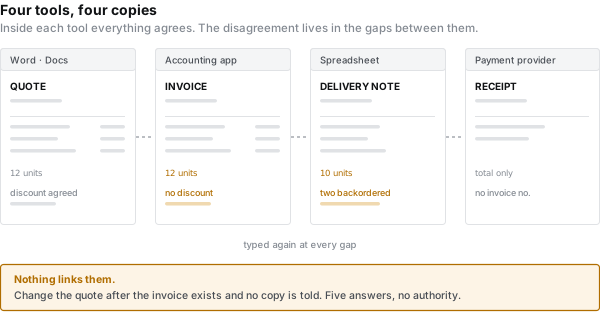
The inconsistency lives between them, and the thing bridging them is a person with a clipboard in their head.
Copying has a property that is easy to miss: it freezes a moment. Once you have pasted the line items into the invoice, that invoice stops knowing about the quote. Change the quote afterwards and nothing tells you the invoice is now wrong. There is no link to follow, no warning, no flag. The two documents are related only in your memory of having made them.
So the real cost is not the twenty minutes of retyping. It is that you now have five answers to the question "what did we agree to sell them", and no way to tell which one is authoritative.
Can you get away with one spreadsheet?
For a few dozen orders a month across three or four document types, yes, and you should stop reading after this section.
The shape that works is two sheets rather than one. An orders sheet with one row per order, holding the customer, the dates, the numbers and the terms. An items sheet with one row per line item, each row carrying the order number it belongs to. That second sheet is the piece people skip, and skipping it is why spreadsheet invoicing usually collapses at the first order with more than three lines.
Then one tab per document type, each pulling the same order from the same place:
=QUERY(items!A:F, "select B,C,D,E where A = '"&B1&"'", 0)The quote tab shows unit price, line total and the validity date. The delivery note tab selects the same rows and simply does not include the price columns. The invoice tab adds tax. Nothing is retyped, because every tab reads from items.
To get PDFs out, Apps Script exports a named range. About fifteen lines:
function exportTab(sheetName, orderNo) {
  var ss = SpreadsheetApp.getActive();
  var gid = ss.getSheetByName(sheetName).getSheetId();
  var url = ss.getUrl().replace(/edit$/, '')
    + 'export?format=pdf&gid=' + gid
    + '&portrait=true&fitw=true&gridlines=false&printtitle=false';
  var blob = UrlFetchApp.fetch(url, {
    headers: { Authorization: 'Bearer ' + ScriptApp.getOAuthToken() }
  }).getBlob().setName(sheetName + '-' + orderNo + '.pdf');
  return DriveApp.getFolderById(FOLDER_ID).createFile(blob);
}
Document numbers come from the sheet itself, incremented when a row is added.
What it costs you. Every new document type is a new tab and a new set of formulas, and formulas accumulate until exactly one person in the company can safely change them. Page control is poor: past thirty or forty line items, the page break lands in the middle of the table and there is not much you can do about it from inside Sheets. Getting the output to look like your company's paperwork rather than a spreadsheet is a fight you will eventually lose. And this only produces documents. Whether the quote was accepted, whether the invoice was paid, whether that order is still open — none of that lives here.
Honest assessment: an afternoon to build, and it will carry you a surprisingly long way.
How far does the "convert quote to invoice" button get you?
Two or three document types, and it handles those well.
Almost every billing and accounting tool has this. You make a quote, the customer accepts, you press a button, and the line items become an invoice with a new number and a link back to the quote. Some will chain further into a receipt when payment is recorded. Inside that path there is no retyping at all, and the audit trail between documents is real rather than remembered.
If your business runs on quote, invoice, receipt, this is the answer and it is cheaper than anything else in this article.
What it costs you. The coverage stops abruptly. Delivery notes, packing slips, goods-received acknowledgements and statements are usually absent, and the moment you need one you are back in a spreadsheet, copying by hand, with the same drift as before. Layout control is typically limited to a logo and an accent colour, which matters more than it sounds when a customer's procurement rules require specific wording or a reference block in a particular place. And the data is inside that tool, so anything you want to produce outside it starts with an export.
What about just duplicating a template file?
It is the most common approach, it survives the longest, and it goes wrong the most quietly.
Copy last month's Word or InDesign file, change the numbers, save under a new name. No new tools, total control over layout, and for a handful of documents a year it is completely correct.
What it costs you. Copies multiply, and the day the template changes you have two populations of documents that do not match. More to the point, it does nothing about the problem in this article. The copies still do not know about each other. You have changed the tool, not the structure.
So how do you choose?
Count the document types, and ask how much data they share.
- One or two documents, and orders are rare. Duplicate a template. Genuinely.
- Quote, invoice, receipt, a few dozen a month. Use the conversion feature in your billing tool.
- Three or four types, and the layout is stable. One spreadsheet, two sheets, a tab per document.
- Five or more types, and the paperwork has to look like yours. Keep reading.
What changes when the order is data and the documents are layouts?
The five documents stop being five files and become five views of one object.
An order is a piece of JSON: the parties, the dates, the numbers, the terms, and an items array. Each document is a template that receives that object. They differ only in which parts they show and how they arrange them.
- Quote shows unit price, line total and a validity date.
- Purchase order shows item, quantity and the date it is needed.
- Delivery note shows quantity and nothing else. No money on the page.
- Invoice shows the taxable amount per rate, the tax and the total.
- Receipt shows the payment method, the date received and the invoice number it settles.
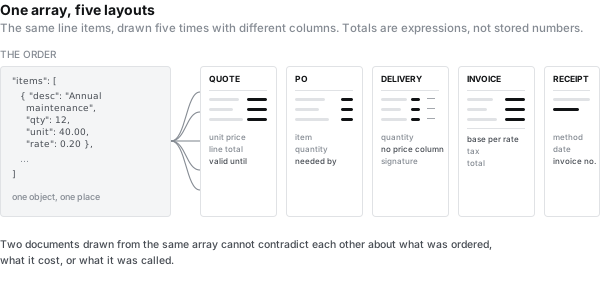
Totals are not stored anywhere. They are expressions over the array, evaluated when the document is rendered, which means five documents produced from one order cannot disagree about arithmetic. The first piece in this journal made the same argument about VAT rates on a single invoice. It holds across documents for the same reason: a number computed from the lines cannot drift away from the lines.
Item descriptions come from one place, so they cannot be "Annual maintenance" on one page and "Maintenance (2026)" on another. If a line is added to the order, every document that has not been issued yet already has it.
The gallery has these laid out as working templates: a quotation with a validity block, a delivery note with quantities and a signature line, a credit note for the corrections. There is also a step-by-step build of a delivery note that goes further than the document itself, into rendering in the background, getting a webhook when it finishes, and binding the result together with a PDF the customer sent you.
The point is not the templates. It is that two documents generated from the same array cannot contradict each other, and two documents typed from the same array eventually will.
Whether a delivery note shows prices is a matter of local practice, not a rule. Plenty of companies leave money off it because the page is handled by the recipient's warehouse staff, and plenty of others include it because their customer checks value on receipt. Ask the customer. It is one column in a template either way.
What this approach does not do
Three things, and they all come from the same boundary: producing documents is not the same job as running a business.
It does not track state. Whether the quote was accepted, how much of the order has shipped, whether the invoice was paid — that belongs in your billing or ERP system. Document generation reads that state and draws it.
It does not allocate numbers. Sequence numbers should be issued by the system that owns the ledger and passed in, not generated at render time. Render the same invoice twice with a render-time counter and you have two numbers for one invoice, which is precisely the thing an auditor looks for.
There are ceilings. A table holds up to 2,000 rows, a document up to 100 pages, and a single image up to 320KB. A year-end statement with several thousand lines is not a document problem, it is a report, and it wants a different tool.
And if you only produce two kinds of document, none of this is worth doing. The first line of that list is the honest answer.
What this article does not solve
Partial shipments and returns are not a document problem. They are a decision about how an order is allowed to split, and the documents only show the result. Get the rule right first.
How your customer ingests what you send is a separate question again. A PDF that a person reads correctly and a structured invoice a machine can post automatically are different requirements, and in several European countries the second one is now mandatory.
The set of five in this article is common, not canonical. Korean trading practice puts weight on the 거래명세서, Japanese practice on the 納品書, and neither maps exactly onto an American delivery note. Ask your customers which documents they expect before you build templates for the ones you assume.
Typing the order five times is not painful because it is boring. It is painful because one of those five times will be wrong, and the person who finds out will be your customer. Connecting the documents is not really about saving the twenty minutes. It is about removing the places where they are allowed to disagree.
Make this document yours in five minutes
Copy the template from this article and swap in your own data. Korean and Japanese fonts are already bundled — nothing to install.
Copy the template →