If you run a race, your registration platform has probably solved more of your paperwork than you give it credit for. It assigns bib numbers, prints check-in labels at packet pickup, and emails a finisher certificate the same afternoon. That part works.
Then you count the people who are not participants.
Start with what the platform already does
It is worth being precise about this, because a lot of advice on event documents ignores it.
Bib assignment is handled. RunSignup and Race Roster both assign bibs in bulk before the event or dynamically at check-in, and their check-in apps drive a label printer so a walk-up registrant leaves the desk with a printed bib.
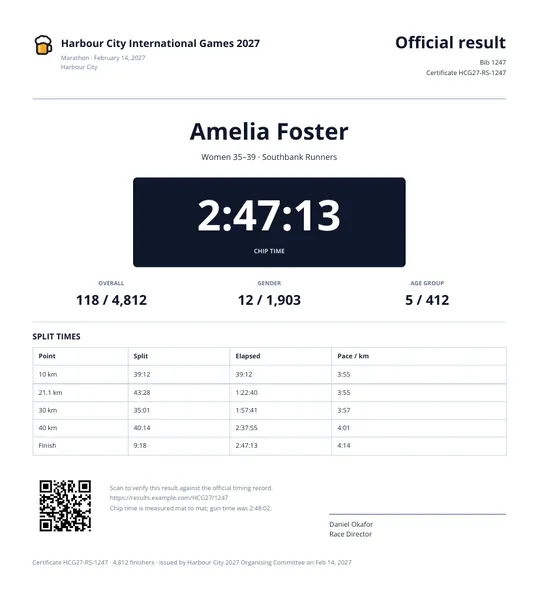
Finisher certificates are handled too. RunSignup generates them from results with the runner's name, race name, finish time, place and logo filled in automatically. RACE RESULT, RaceID and most chip-timing providers do the same — the participant clicks a link and gets a certificate.
So if your event is a straightforward road race and everyone who needs a piece of paper is a registered runner, this article is not for you. The platform has it.
The people who are not participants
Now the list that does not come out of the registration platform, because those people never registered as participants:
- Officials and staff. Chief judges, timing crew, competition management. They need access to areas the public does not go, and the card has to say which areas.
- Volunteers. Course marshals, water stations, bag drop, finish line. Different roles, different places, and a marshal needs to be identifiable as a marshal from twenty metres.
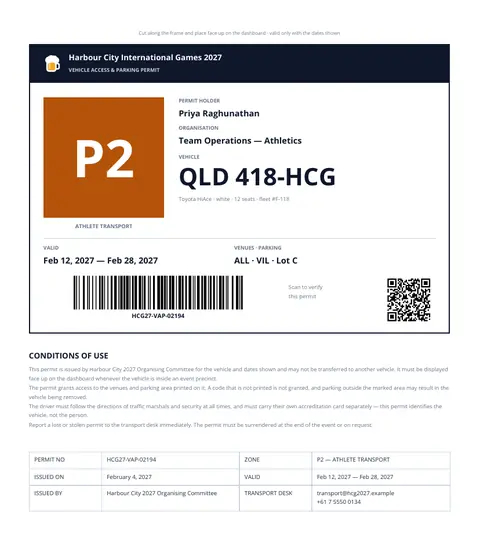
- Drivers and vehicles. Shuttle vans, lead vehicles, medical, VIP transport. The permit goes on a dashboard, not around a neck.
- Media. Photographers with field-of-play access, and the access is usually narrower than everyone assumes.
For a mid-size event that is a few hundred people, not a few thousand. Small enough that nobody buys an accreditation system for it, large enough that doing it by hand is a week of somebody's life.
What people actually do for these
The honest answer is a spreadsheet. Even when registrations come from a platform, the export becomes an Excel or CSV file, and that file is where the staff list lives.
From there the traditional route is Word: open an Avery template, place the fields, run a mail merge, check the alignment, export to PDF, and fix the layout when something shifts. That is a real workflow and it is genuinely what a lot of events do — for volunteer badges, not for bibs.
It works until one of three things happens.
Why these documents are harder than a name badge
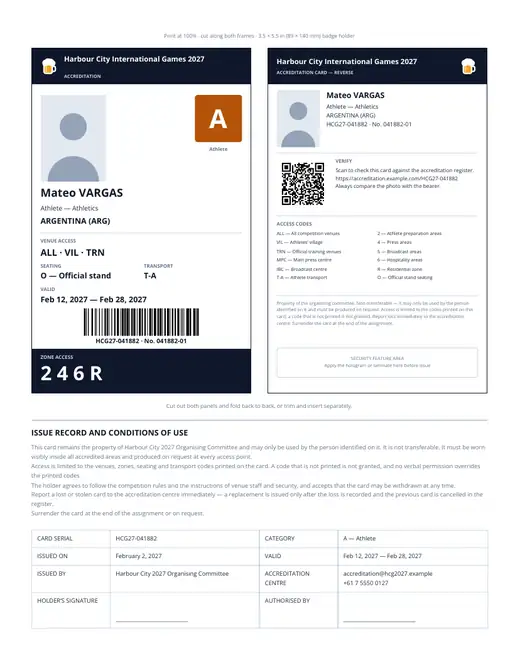
The codes are the permission. A staff card is not a name tag with a logo. The International Paralympic Committee's published accreditation specification sets out what has to be visible: a large category letter with a background colour, the photo on both sides, and the venue, zone and transport codes the holder is entitled to. Zone 2 is athlete preparation, 4 is press, 5 is broadcast. A card with the wrong number is not a typo — it is someone standing somewhere they should not be, and you find out at a gate.
A mail merge will put whatever is in the cell into the box. It has no opinion about whether column H was shifted by a sort.
The layout is a physical contract. A badge goes into a holder, and the common ones are fixed sizes — 3.5 × 5.5 in for a lanyard badge, or one of the Avery sheet formats if you are printing on adhesive stock. Four millimetres too wide and it does not go in, which you discover after the print run. A dashboard permit has the opposite constraint: it is read from outside the car by someone in a high-vis vest, so the zone code has to be large enough to read at two metres, and the layout gets designed around that rather than around the text.
Word processors lay out in a flow. Paragraphs stack; a longer name pushes what is under it. That is fine for a letter and wrong for a card where the zone band has to sit at a fixed distance from the bottom edge. It is also why per-row photos are painful in a merge — the INCLUDEPICTURE field trick with absolute paths works, until a 4000 × 3000 camera export gets scaled into a 3:4 box and produces a stretched face that nobody notices until print.
What the alternatives actually cost
Keep using the merge
For volunteer badges with a name, a role and a colour, this is fine and you should keep doing it. Two hours, no new tools, and the alignment problems are solvable with one test sheet.
It stops being fine when you need per-person photos, when a code field has to be checked rather than typed, or when you need one file per person rather than one long PDF. Splitting afterwards with qpdf or pdftk and matching pages to rows by position is exactly the operation that silently goes wrong by one.
Print on-site instead of in advance
This is what larger events do, and it removes a whole class of problem. Direct thermal printers produce a badge in two to five seconds with no ink or ribbon; full-colour PVC cards take around 45 seconds. Nothing is printed until the person is standing there, so a late change is not a reprint — it is just the print.
The cost is equipment, a staffed station, and a data lock: exhibition workflows typically freeze the file 48 to 72 hours before doors open. Thermal is also monochrome on label stock, which is a real constraint if your access scheme relies on colour.
Build it as HTML and print with a headless browser
CSS gives you what a card needs — absolute positioning, real units (mm works), @page size control, embedded fonts so the server renders what the designer approved. Barcodes are a library call. This is how most specialist credential vendors build theirs.
The cost is that it becomes a service you own. Chromium somewhere, memory, a queue, someone on call during the event. And the design lives in code, so moving the category badge because it clashes with a sponsor block is a pull request rather than a drag.
A note on fonts, because it catches people in both the server-side options: the document renders with the fonts on the machine that rendered it, not the ones on the designer's laptop. Different metrics, different line wraps, and a name that fitted on one line now takes two and pushes the zone code off the card. If you go server-side, embed the fonts rather than naming them.
The other way: describe the document once, then send it rows
The approach that avoids the split is to treat the document as data rather than as a file.
You describe the card once — boxes at coordinates, styles, a photo frame, a barcode that encodes a field — and store that description. Generating three hundred cards is then three hundred rows posted at it. The layout is not re-done per person and cannot drift per person, because there is only one of it. Moving the category badge is an edit in a visual editor, not a deploy.
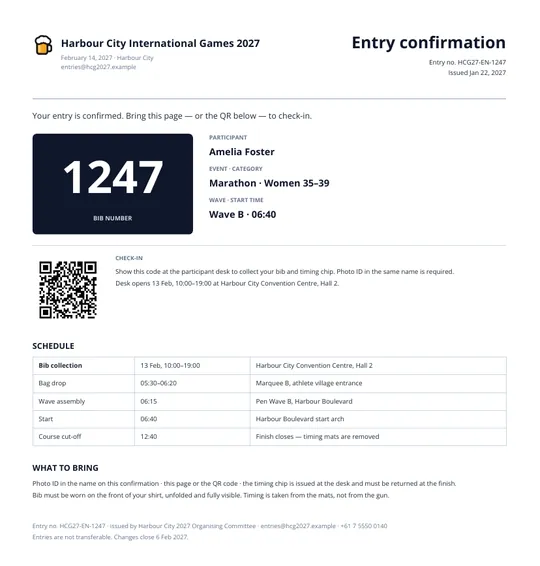
For the documents in this article that mostly matters for the staff card and the vehicle permit, because those are the ones nobody else is printing for you. I keep a set of four event documents in the BrewMyPDF gallery and fork one per event — the accreditation card, the vehicle permit, an entry confirmation and a result certificate, sharing one code vocabulary so a P2 on a dashboard means what it means on a card.
The last two overlap with what a registration platform gives you, and if yours does it well you should use that instead. They are there for events that do not run on one — club races, school meets, corporate and charity events, anything where the participant list arrives as a spreadsheet from somewhere else.
Ceilings worth knowing before you commit: a single run caps at 2,000 rows and a document at 100 pages. An embedded image caps at 320KB, which matters for badge photos — a raw camera export is many times that and has to be resized first. Photos also have to arrive as data rather than as a link to a photo server; a URL in an image field will not fetch.
What this does not solve
It does not fix your data. If the zone codes in the staff spreadsheet are wrong, they will be printed correctly and wrongly, three hundred times, very fast. Templating removes layout errors and does nothing about content errors. The check before a print run gets shorter, not optional — you are checking values instead of checking values and layout.
It is not a security feature. A PDF cannot be a hologram. Every real credential scheme puts something physical on the card — a laminate, a hologram, an RFID inlay — and the printed document only reserves space for it.
It does not replace access control. The barcode is a value. Something at the gate reads it and decides. The document is one end of that contract.
And it does not print, cut or sleeve anything. What you can do at the document stage is make the cut line real — print the frame at exactly the holder size, so the person with the guillotine has a line to follow rather than a judgement to make.
Where to start
Decide what is a column before you pick a tool.
Write down every value that differs between two people's cards: name, role, organisation, photo, registration number, zone codes, seating, transport, validity. That list is your schema, and merge fields, script variables and template bindings all need it before they can do anything. Events that struggle usually have a version of that list living in four spreadsheets with three different spellings of the same code.
Then choose per document rather than for all of them. Volunteer badges are a merge. The staff card and the vehicle permit are layout contracts and want real coordinates. The bib and the finisher certificate are probably already handled by the platform you are paying for — check before you rebuild them.
And whichever you pick, print one and cut it out by hand before you print three hundred. Put it in the holder. Hold it at arm's length and see whether the zone code is readable. That physical check catches more than any amount of reviewing on screen, and it takes four minutes.
Make this document yours in five minutes
Copy the template from this article and swap in your own data. Korean and Japanese fonts are already bundled — nothing to install.
Copy the template →